
Search the plugin directory for a WordPress chatbot plugin and you get several hundred results. Half of them are chat widgets with no AI in them. A third are thin connectors to somebody else’s cloud platform. A few are genuinely good, and almost all of them say “free forever” on the label.
The reason people end up installing three of these and keeping none is that the plugins look identical from the outside and behave nothing alike once they are running. One needs you to type out every answer by hand. One needs an API key and a credit card at OpenAI. One works out of the box but charges you per reply, so the bot gets more expensive precisely when it starts working.
This guide sorts the category into three types, gives you four questions that separate them, then compares nine plugins on the things that actually decide the outcome: what trains the bot, who pays for the AI, what happens when the bot cannot answer, and what the bill looks like when your traffic triples.
The three kinds of WordPress chatbot plugin
Almost every plugin in the directory is one of these three. Working out which one you are looking at takes about thirty seconds and saves you a weekend.
Rule based, or native. Everything runs on your own server. You write the questions and the answers, or you build a flow out of buttons, and the plugin serves them from your WordPress database. There is no model in the loop, so there is nothing to pay for and nothing to go wrong. The trouble starts the moment a visitor phrases a question in a way you did not predict, which is most of the time.
Bring your own key. The plugin is free, and you sign up separately with OpenAI, Anthropic, Google or a router service, then paste an API key into the settings. The plugin becomes the interface and the model does the thinking. You get real control over which model answers, and your costs stay low while traffic is low. You also own the setup, the tuning and any surprise on your provider bill.
Cloud connected. The plugin talks to a vendor platform that has already read your site and stored it in a searchable form. You get one plan that includes the model, the training, the dashboard and the chat history. The trade is a cap on messages or credits, and the fact that visitor questions leave your server to get answered.
None of these is the right answer for everyone. A documentation site with a small team and predictable traffic is well served by bring your own key. A business that wants a working bot this afternoon and one bill a month wants cloud connected. A site with twelve genuine FAQ entries and nothing else may not need AI at all.
How a content trained chatbot answers a question
This part matters more than any feature list, so it is worth being concrete about what happens between the visitor typing and the bot replying.
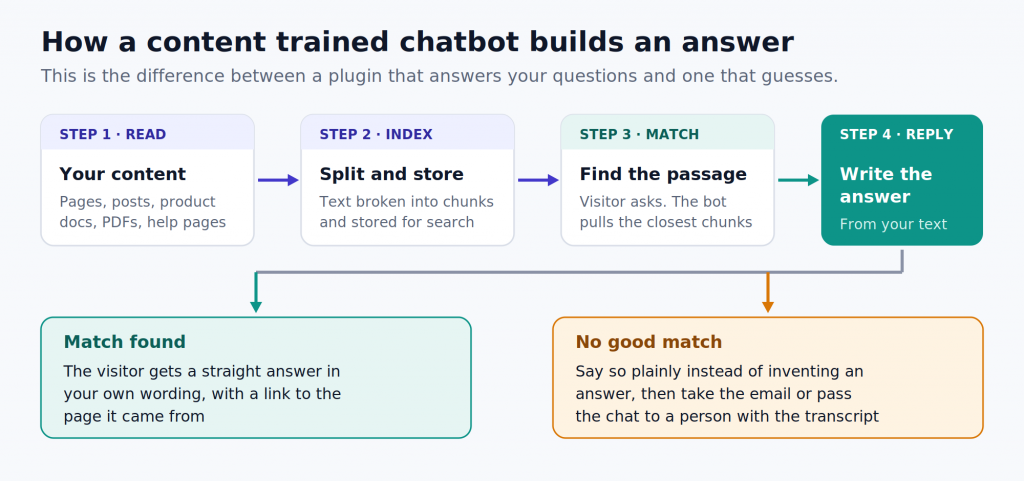
A bot trained on your content does not memorise your website. It reads your pages, posts, product docs and PDFs, breaks them into small chunks, and stores them so it can search by meaning rather than by keyword. When a visitor asks something, the bot finds the two or three chunks that come closest, hands them to a language model, and asks it to write an answer using only those chunks.
Two things follow from that, and they explain most of the complaints people have about chatbots.
First, the bot is only as good as what you fed it. If your shipping policy lives in a PDF nobody linked, and you never uploaded it, the bot cannot answer shipping questions. Retraining after you publish or edit a page is not a nice extra, it is the difference between a bot that is right and a bot that quotes last year’s prices.
Second, the interesting behaviour is what happens when nothing matches. A good bot says it does not know, then does something useful: takes an email address, opens a ticket, or passes the conversation to a person with the full transcript attached. A bad bot fills the silence with something plausible and wrong, and you find out when a customer quotes it back to you.
Four questions to answer before you install anything
1. Does it learn from my content, or do I write every answer?
Ask how the bot gets trained. Crawling a sitemap, importing posts and pages, uploading files and adding question and answer pairs are all good signs. So is a retrain button, and better still an automatic retrain when a WordPress post changes. If the setup guide walks you through building conversation trees, you are buying a scripted bot with an AI badge on it.
2. Who pays for the AI, and what happens at the cap?
There are only three answers here. The plan includes it, you bring your own API key, or the AI is a separate add-on stacked on top of the base plan. That third one catches people out, because the price on the pricing page is the price of the chat widget and not the price of the intelligence. Find the cap, then find what going over it costs.
3. What happens when the bot cannot answer?
Look for email handover, a live chat takeover, or a jump into WhatsApp or Messenger that carries the transcript across. A bot with no exit route sends confused visitors back to your contact form, which is where they were headed before you installed anything.
4. What does this cost at ten times my current volume?
Do the arithmetic before you commit, not after. Take your current chat volume, multiply by ten, and price the plan again. Watch for three specific things: per seat fees that jump when a colleague joins, AI billed per reply, and a monthly charge to take the vendor’s badge off your widget.
The 9 best WordPress chatbot plugins in 2026
| Plugin | Where the AI runs | Free plan | Paid from | Best for |
|---|---|---|---|---|
| AI BotKit | Vendor cloud, model included | Every feature, 100 messages | $12 per month | Content trained support and lead capture |
| AI Engine | Your own API key | Full plugin, free | Yearly licence plus token costs | Control over the model |
| WPBot | Native, or your API key | Working rule based bot | $39 per year | One time cost and WooCommerce |
| Tidio | Vendor cloud, AI billed apart | 50 conversations | $29 per month | Teams that need live chat too |
| Tawk.to | Human first, AI as add-on | Unlimited chats and agents | Add-ons from about $19 | Free live chat with real people |
| Chatbase | Vendor cloud, credit metered | 50 credits, expires | $40 per month | A single agent across channels |
| HubSpot | Rule based free, AI on higher tiers | Chat plus free CRM | About $15 per seat | Lead capture into a CRM |
| Zoho SalesIQ | Vendor cloud, AI on top tier | 3 operators, 100 chats | $10 per operator | Sites already running Zoho |
| Crisp | Vendor cloud, shared inbox | 2 seats, unlimited chats | About $45 per month | Small teams juggling channels |
Prices move. Check the vendor page before you buy, and read the row that says what happens when you exceed the plan.
1. AI BotKit: the shortest path from your content to a working bot
AI BotKit is the cloud connected type, built as a WordPress plugin first. You install it, point it at your pages, posts, custom post types, URLs and files, and it trains a bot on what it finds. Setup takes minutes rather than an afternoon, and there is no API key to manage.
The parts worth knowing about:
- Training takes your WordPress content directly, along with uploaded PDFs, DOCX and PPTX files, plain text and question and answer pairs. Automatic retraining when WordPress content changes is on the mid tier and up, which keeps answers current without you remembering to press anything.
- Handover is treated as a real feature rather than a footnote. The bot can email a transcript, hand off to a person, or move the conversation into WhatsApp, Instagram, Messenger or Telegram with context intact.
- Lead capture, chat history, 95 or more languages and a shareable chatbot page are all available on the entry paid tier rather than reserved for enterprise plans.
- Webhook actions let the bot do things instead of only talking, which is where the interesting work is. Booking a call, checking an order, filing a ticket.
Where it falls short: the free plan gives you a one time pool of messages rather than a monthly allowance, so it is a proper evaluation rather than a permanent home. Removing the “powered by” badge sits on the top tier. And because message volume drives the plan, a site fielding thousands of chats a month needs to price the right tier rather than assume the cheapest one holds.
Price: free to evaluate with every paid feature switched on, then plans from $12 a month, with roughly 17 percent off for annual billing. See the current plans and limits.
Pick it if you want a bot that answers from your own content, hands over cleanly when it cannot, and bills you one predictable amount. Start with the WordPress plugin.
2. AI Engine by Meow Apps: for people who want the model in their own hands
AI Engine is the best known bring your own key option in the directory, with more than 100,000 active installs and a 4.9 rating on wordpress.org. It connects WordPress to OpenAI, Anthropic, Google, Mistral and others, then gives you a chatbot, content tools, embeddings and forms on top.
What it does well: the model choice is genuinely yours, the embeddings feature lets the bot answer from your own content, and the free version is a complete plugin rather than a teaser. Development is active and the documentation is honest about what is experimental.
Where it falls short: you are the integrator. You sign up with a provider, manage keys, pick models, tune prompts and watch token spend. If nobody on the team enjoys that, the setup stalls at step two. There is also no included support beyond the community unless you buy the Pro licence.
Price: free on wordpress.org. Pro is a yearly licence in the region of $79 and up, and you pay your model provider separately for every answer.
Pick it if somebody on your team is comfortable with API keys and you want to choose the model and pay wholesale for it.
3. WPBot: native first, with a one time licence option
WPBot has been around longer than most of this list and takes an unusual position. It runs natively on your server and works with no AI at all, using buttons, site search, conversational forms and stored replies. Then it layers AI on top when you want it, either through your own OpenAI or Gemini key or through a router that reaches Claude, Grok, DeepSeek and others.
What it does well: a working bot with zero external dependencies, a vector knowledge base on paid tiers so answers come from your own pages and files, deep WooCommerce features on the higher licence, and a lifetime licence for people who are tired of subscriptions.
Where it falls short: the install base is small next to AI Engine, at roughly 5,000 active installs with a 4.7 rating across more than 120 reviews, and the settings screen is dense enough that first setup takes real attention. WooCommerce support sits on a higher tier than the entry licence.
Price: free version on wordpress.org. Paid licences start around $39 a year, with lifetime options from about $149, and WooCommerce features on the tier above that.
Pick it if you want predictable one time cost, self hosted data, or a bot that still works when the AI budget runs out.
4. Tidio: strongest if you need live chat as much as automation
Tidio is a full customer messaging platform with a well maintained WordPress plugin and around 80,000 active installs. You get live chat, a shared inbox, rule based Flows, and Lyro, the AI agent that answers from your knowledge base.
What it does well: the human side is properly built. Visitor monitoring, canned replies, a real mobile app, ecommerce features that fit WooCommerce, and a support team used to small businesses. If half your problem is answering chats faster rather than answering them automatically, Tidio is a serious option.
Where it falls short: the billing has three separate meters. Billable conversations set your base plan, Lyro AI conversations are metered on their own, and Flow triggers are counted separately again. The advertised entry price buys you chat, not AI. There is also a large gap between the mid tier and the next one up, which leaves growing teams with nowhere comfortable to land.
Price: free plan with 50 conversations a month. Starter is around $29 a month and Growth around $59, with the Lyro AI add-on from roughly $39 a month for a small pool of AI conversations. The tier above Growth starts near $749.
Pick it if you have people available to chat and you want AI as an assistant to them rather than a replacement for them.
5. Tawk.to: the most honest free option, as long as you read the add-ons
Tawk.to genuinely gives away live chat. Unlimited agents, unlimited conversations, unlimited history, a ticketing system and a knowledge base, all at no cost across hundreds of thousands of sites. The company makes money on add-ons instead of seats.
What it does well: nothing else on this list lets a small team run real chat coverage for nothing. The widget is solid, the apps work, and you can hire trained human agents by the hour if you need cover overnight.
Where it falls short: two things. Removing the Tawk.to badge is a paid add-on, priced per property, somewhere between $19 and $39 a month depending on the plan you are quoted. And the AI add-on is mainly built to suggest replies to your human agents rather than resolve conversations on its own, starting at around $29 a month for a thousand messages. If your goal is a bot that handles questions while nobody is at the desk, this is not the model.
Price: core product free. Branding removal and AI are separate paid add-ons.
Pick it if you have humans to answer chats and no budget, and you can live with a badge on the widget for now.
6. Chatbase: a strong agent that happens to sit on WordPress
Chatbase is a platform rather than a WordPress product, and you add it to your site with a script or a plugin. It is good at what it does: train an agent on your content, give it actions it can perform, and put it on your website, WhatsApp, Instagram and more from one place.
What it does well: the agent building experience is polished, the actions system is genuinely capable, and multi channel deployment from a single knowledge base is convenient if you are answering the same questions in four places.
Where it falls short: the credit model. Every AI reply draws down a credit balance, and premium models consume several credits per reply, so a busy week can drain a month’s allowance. The free plan is a sandbox with 50 credits, and agents get deleted after two weeks of inactivity. Branding removal and a custom domain are separate charges again.
Price: free plan with 50 credits. Hobby is around $40 a month, Standard around $150 and Pro around $500, with roughly 20 percent off annually and extra credits sold in blocks.
Pick it if WordPress is one of several places you need the same bot, and your chat volume is steady enough to size credits properly.
7. HubSpot: worth it for the CRM, not for the AI
The HubSpot plugin is one of the most installed on this list, past 200,000 active installs, and much of that is because it brings a free CRM with it. The chat widget and the rule based chatflow builder come along at no cost.
What it does well: every conversation lands on a contact record. You can qualify a lead in chat, book a meeting, and have the whole thing sitting in a CRM your sales team already lives in. For lead capture rather than support, that connection is worth more than a smarter bot.
Where it falls short: the free bot is rule based, not trained on your content, and it carries HubSpot branding. The AI agent sits in higher Service Hub tiers and consumes HubSpot credits on top of per seat pricing, which gets expensive quickly by the standards of this list.
Price: plugin, chat and CRM free with branding. Service Hub Starter is around $15 per seat a month, with the AI tiers well above that.
Pick it if the point of the chatbot is to feed a sales pipeline and you are heading for HubSpot anyway.
8. Zoho SalesIQ: sensible pricing, with the AI on the wrong tier
SalesIQ is Zoho’s live chat and visitor tracking product, with a WordPress plugin and pricing that undercuts most of this list on a per seat basis. The free plan carries three operators and 100 chats a month, which is more generous than most.
What it does well: it plugs into Zoho CRM, Desk and the rest of the suite without any work, offers a codeless flow builder for scripted bots, supports multiple data regions, and costs very little per operator.
Where it falls short: the AI answer bot, which is the part that reads your knowledge base and replies in its own words, sits on the Enterprise tier. Everything below that gives you the flow builder instead. Visitor and session caps also need watching on a high traffic site, and the interface follows Zoho conventions that take a while to learn.
Price: free for three operators. Basic is around $10 per operator a month, Professional around $17 and Enterprise around $25, with a useful discount for annual billing.
Pick it if you already run Zoho and want chat that reports into it.
9. Crisp: the nicest inbox for a small team
Crisp is a messaging platform with a genuinely good free tier: two seats, unlimited conversations, a shared inbox and a clean widget that does not look like it was bolted on. It pulls website chat, email and social messages into one place.
What it does well: design and speed. Of everything here, Crisp feels the most like a modern messaging app rather than a support tool. Co-browsing and live typing previews are unusual and useful when you are talking somebody through a checkout.
Where it falls short: two seats is a hard ceiling, and the bot on the free plan handles simple flows rather than answering from your content. Real automation sits on the paid plans, which start around $45 a month per workspace.
Pick it if two people handle everything, and a tidy shared inbox matters more to you than automation.
What “free” actually means on a plugin page
Every plugin above has a free tier, and no two of them mean the same thing by it. Five patterns cover almost the whole category.
Free as a trial in disguise. A one time pool of messages, or agents deleted after a fortnight of inactivity. Useful for judging quality, unusable as a permanent setup.
Free with the vendor’s badge on your widget. Unlimited chats, and a monthly fee to take the logo off. Perfectly fair, as long as you know the add-on is coming.
Free, with no AI in the free tier. Buttons and scripted flows cost nothing. The part that reads a question and answers it does not.
Free plugin, you pay the model. No licence fee at all. Your card sits with OpenAI or Google instead, and the bill tracks your traffic.
Free with every feature, capped on volume. You can test the real product end to end and only pay when chat volume grows. This is the version that tells you the most before you spend anything.
If you are still deciding whether to pay at all, our breakdown of what free chatbot plans actually give you goes tier by tier.
Four pricing models, and the one that breaks first
The sticker price tells you almost nothing. The billing model tells you everything, because it decides what happens when the bot starts working and volume climbs.
Credits per reply looks cheapest at the bottom and gets punishing at the top. Every answer draws down a balance, and premium models draw down several credits at once. A bot that resolves more questions costs you more money, which is an odd incentive to sign up for.
Per seat is stable until the day a colleague needs access, then it steps. Fine for teams with fixed headcount, awkward for agencies and anyone who adds seasonal help.
Flat plan with message caps is the most predictable, provided you size the tier honestly and know the price of a top up.
Your own API key is the cheapest at low volume and stays close to linear as you grow. You pay for it in setup time and in owning the problem when something misbehaves.
For a fuller picture with worked examples, see what it costs to add a chatbot to WordPress.
What the plugin does to your page speed
This is where the type of plugin matters again, and where most roundups say nothing useful.
A cloud connected widget usually loads a small script that fetches the chat interface after your page has painted. Done properly, the effect on your Core Web Vitals is close to nothing, because the widget is not blocking anything your visitor is waiting for. Check two things anyway: whether the script is deferred, and whether the widget is loading on every page or only where you need it.
A self hosted plugin puts the work on your own server instead. There is no third party script, which is good for privacy and for people with strict content security policies, but AI features that build a vector index will use CPU and database space, and cheap shared hosting notices. Bring your own key plugins also add response latency you cannot control, because the answer waits on your model provider.
Two habits worth keeping either way. Load the widget only on the pages where it earns its place, and test your slowest page with and without the plugin active rather than trusting anybody’s benchmark.
If you would rather avoid the plugin route altogether, we have written up adding a chatbot without a plugin.
Setting one up in about ten minutes
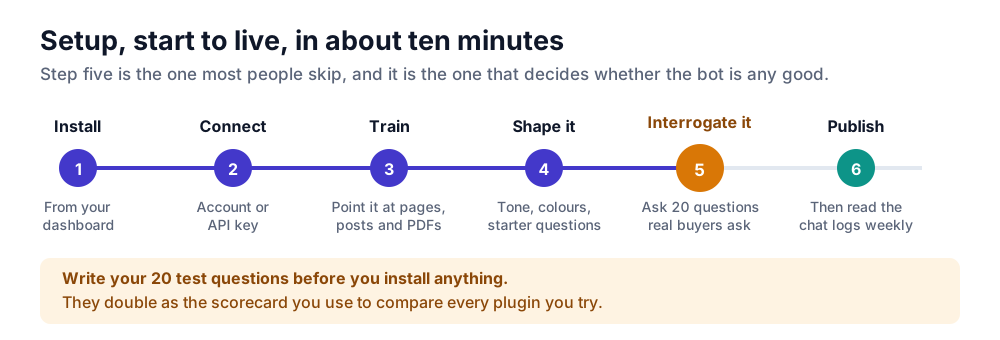
The mechanics are quick for any cloud connected plugin. The judgement is in step five.
- Install. Plugins, then Add New, search for the plugin, install and activate.
- Connect. Sign in to the vendor account, or paste an API key if you chose the bring your own key route.
- Train. Point it at your pages and posts, add your sitemap, upload the PDFs your support team keeps sending people. Include your pricing and policy pages, which is where most real questions land.
- Shape it. Set the tone, the colours, the greeting and three or four starter questions. Starter questions do more for engagement than any amount of styling, because most visitors do not know what to ask a bot.
- Interrogate it. Write down twenty questions your actual buyers ask, then put every one of them to the bot before it goes live. Include the awkward ones about refunds and pricing. This list is also your scorecard for comparing plugins, so write it before you install anything.
- Publish, then keep reading. Check the chat logs weekly for the first month. The questions the bot got wrong are a content plan for your site.
Five mistakes worth avoiding
Training the bot on your marketing pages only. Visitors ask about delivery, refunds, compatibility and price. If those answers live in email threads, the bot has nothing to work with.
Leaving no way out. Without email capture or a handover route, every question the bot cannot answer becomes a lost visitor.
Sizing the plan for today. Chatbots increase chat volume, because a widget invites questions people would not have emailed. Price the tier above the one you think you need.
Setting it and forgetting it. A bot trained in March quoting March prices in September is worse than no bot. Turn on automatic retraining, or diarise it.
Judging the plugin by its directory rating. For cloud connected plugins, the repository rating measures the connector, not the platform behind it. Test the bot, not the plugin page.
Frequently asked questions
Is there a genuinely free WordPress chatbot plugin?
Yes, but read what the free tier covers. Tawk.to gives away unlimited live chat with a badge on the widget. HubSpot gives away a rule based bot and a CRM. AI Engine and WPBot give away the plugin and expect you to bring an API key. AI BotKit switches on every paid feature for free accounts and caps the message pool instead, which is the version that lets you judge the real product.
Do chatbot plugins slow down a WordPress site?
A well built widget loads after your page renders and costs you very little. The things that hurt are widgets loading on every page when you only need them on a few, plugins that add render blocking scripts, and self hosted AI features running on cheap shared hosting. Test your slowest page with the plugin on and off.
Can a chatbot answer using my own pages and PDFs?
That is what a content trained bot does. It reads your pages, posts and uploaded files, indexes them, then answers from the closest matching passages. Check whether the plugin retrains automatically when you edit content, because a stale index is the usual cause of wrong answers.
Do I need an OpenAI API key?
Only for the bring your own key plugins such as AI Engine, or WPBot’s AI features. Cloud connected plugins include the model in the plan, so there is no key to manage and no separate provider bill.
What is the difference between a chatbot plugin and a live chat plugin?
Live chat routes visitors to a person and is only as good as your coverage. A chatbot answers on its own, at three in the morning, at whatever volume arrives. Most sites want both: a bot that resolves the routine questions and a clean handover for everything else.
Which plugin works best with WooCommerce?
Look for a bot that reads live product data rather than a static copy of your catalogue, plus order status lookups. WPBot has deep WooCommerce features on its higher licence, Tidio is built around ecommerce, and any content trained bot can handle policy and shipping questions once you feed it those pages.
At what point does a chatbot get expensive?
It depends entirely on the billing model rather than the plan name. Credit metered tools get expensive fastest, because cost rises with every answer. Flat plans with message caps stay predictable until you cross a tier. Bring your own key stays cheapest at low volume. Price all three at ten times your current chat volume before choosing.
So which one should you install?
If you want a bot that answers from your own content, hands over to a person when it cannot, and bills you one predictable amount every month, AI BotKit is the shortest route there, and the free plan includes every paid feature so you can judge it properly before spending anything.
If somebody on your team enjoys API keys and you want to choose the model yourself, install AI Engine. If you want one payment and no subscription, look at WPBot. If your real problem is answering chats faster rather than automatically, Tidio or Tawk.to will serve you better than any of the AI first options.
Whichever way you go, write your twenty questions first. The plugin that answers them best is the right one, and no comparison table can settle that for you.