
Most people install their first WordPress chatbot plugin, click through the setup, watch it answer three questions badly, and deactivate it within the week. Then they install another one and it happens again.
The reason is not that the plugins are bad. It is that they are three different products wearing the same label. In the plugin directory they look identical: a chat bubble, a screenshot of a friendly conversation, the words “no coding required.” Once installed, one of them expects you to type out every answer by hand. Another expects a credit card at OpenAI. A third works in ten minutes and charges you more every time it succeeds.
This guide is not a ranked list. It explains what a chatbot plugin actually is, what happens between a visitor typing a question and the bot replying, why the answers go wrong when they go wrong, and what to check before you commit to anything. If you know that much, you can judge any plugin in the directory yourself, including ones that do not exist yet.
What a WordPress chatbot plugin actually is
A chatbot plugin does two jobs, and it is worth separating them because most confusion starts here.
The first job is the widget: the bubble in the corner, the conversation window, the greeting, the styling. This part is genuinely easy and every plugin does it competently. If you are comparing plugins on how the widget looks, you are comparing the part that matters least.
The second job is the answering. Something has to take “do you ship to Ireland” and produce a reply that is true about your business specifically. That something needs your content, a way to search it, and usually a language model to turn the search result into a sentence. This is the part that differs wildly between plugins, costs money, and decides whether the thing is useful.
A chat plugin that only does the first job is a live chat plugin. It puts a window on your site and routes the conversation to a human. That is a legitimate product and sometimes the right one, but it solves a different problem: it makes your team faster, not your site self-sufficient. A chatbot answers on its own, at three in the morning, at whatever volume arrives.
What actually runs where
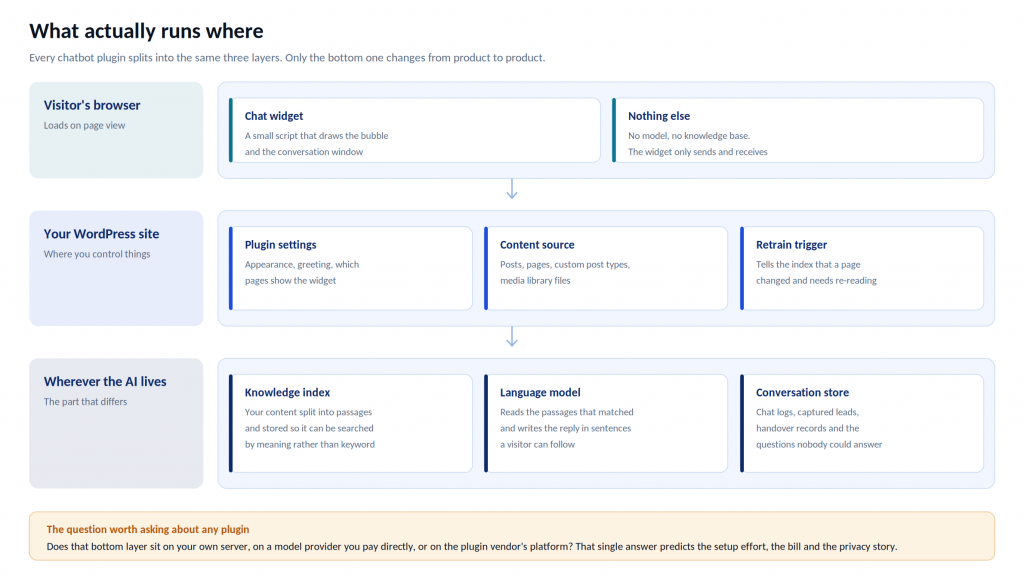
Every chatbot plugin splits into three layers, and only the bottom one changes from product to product.
In the visitor’s browser sits the widget. It is a small script that draws the bubble and the conversation window. There is no model in it and no knowledge base in it. It sends what the visitor typed and displays what came back.
On your WordPress site sits the part you control. The settings screen, the rules about which pages show the widget, and the connection to your content: your posts, pages, custom post types and media library. If the plugin is any good, there is also a trigger that says “this page changed, read it again.”
Wherever the AI lives sits everything else. Your content, broken up and stored so it can be searched. A language model that reads what the search found and writes the reply. And a record of every conversation, every captured lead, and every question nobody could answer.
That third layer is the whole ball game. Does it sit on your own server, at a model provider you pay directly, or on the plugin vendor’s platform? That single answer predicts the setup effort, the monthly bill, the privacy story and what happens when your traffic triples.
The three kinds of WordPress chatbot plugin
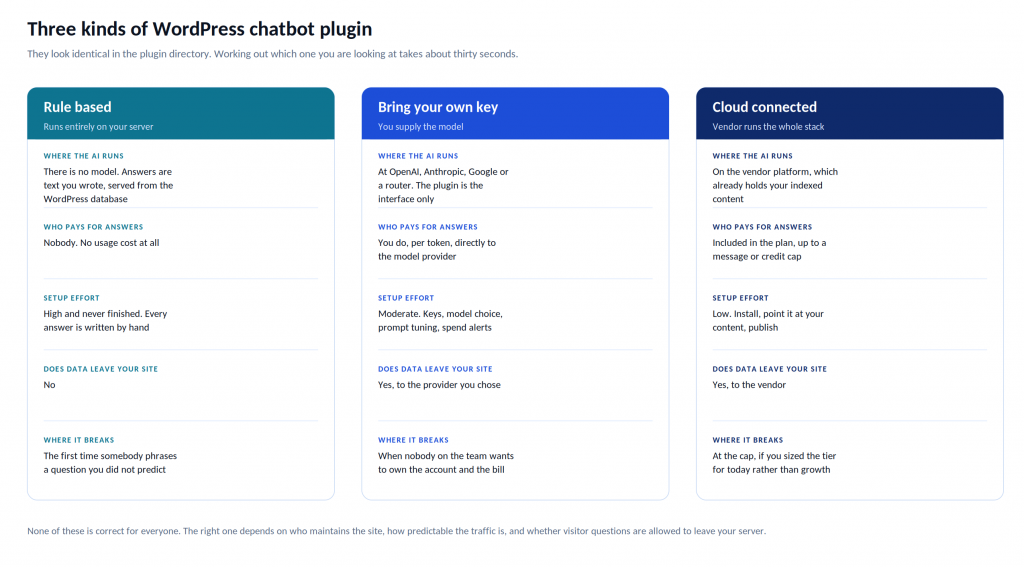
Almost everything in the directory is one of these three. Telling them apart takes about thirty seconds on the plugin page and saves you a weekend.
Rule based
Everything runs on your own server. You write the questions and the answers, or you build a flow out of buttons, and WordPress serves them from its own database. There is no model in the loop, which means there is nothing to pay for, nothing to configure and no data leaving your site.
The trouble arrives the first time somebody phrases a question in a way you did not anticipate, which is most of the time. Rule based bots work well for a short, stable list of genuine FAQs and a site where nobody expects a conversation. They stop working the moment a visitor types a full sentence.
A useful tell: if the setup guide walks you through building conversation trees, you are buying a scripted bot with an AI badge on the marketing page.
Bring your own key
The plugin is free and does the interface. You sign up separately with OpenAI, Anthropic, Google or a router service, then paste an API key into the settings. The model does the thinking and you pay the provider directly for every answer.
This is the cheapest option at low volume and the most flexible at any volume. You choose which model answers. You tune the prompt. You see exactly what you are spending and on what.
You also own all of it. Somebody has to hold the provider account, watch the spend, pick a model, and work out why answers went strange after a version change. Setups of this kind usually stall at step two, when the person who was going to handle the API key gets busy with something else. Be honest about whether that person exists before you choose this route.
Cloud connected
The plugin talks to a vendor platform that has already read your site and stored it in searchable form. One plan covers the model, the index, the dashboard and the chat history. You install, point it at your content, and publish.
The trades are real. There is a cap on messages or credits. Visitor questions leave your server to be answered. And you are trusting a vendor’s roadmap rather than your own.
This is the type most small teams end up with, because the alternative to a working bot this afternoon is usually no bot at all.
None of the three is correct for everyone. The right one depends on who maintains the site, how predictable your traffic is, and whether visitor questions are allowed to leave your server.
How a content trained chatbot answers a question
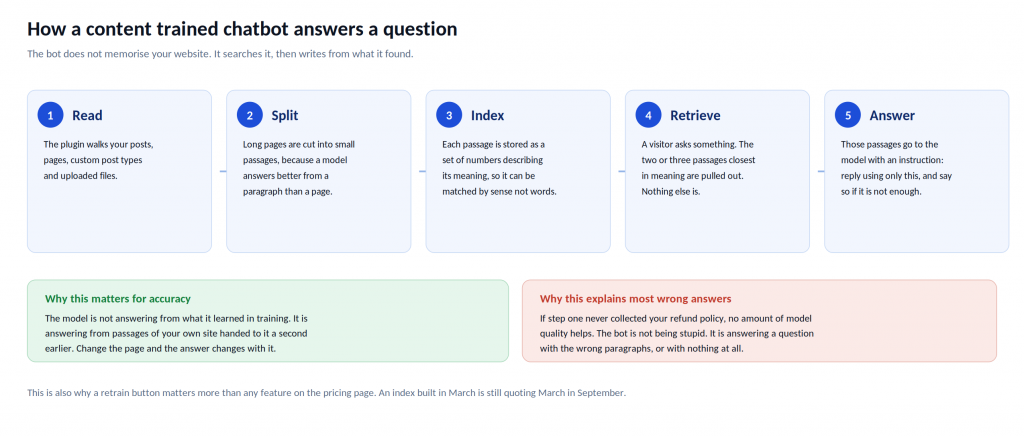
This is the part worth understanding properly, because it explains almost every complaint people have about chatbots.
A bot trained on your content does not memorise your website, and it is not a version of ChatGPT that happens to know about your business. Five things happen:
- It reads. The plugin walks your posts, pages, custom post types and any files you uploaded.
- It splits. Long pages get cut into small passages, because a model writes a better answer from one relevant paragraph than from a 3,000 word page.
- It indexes. Each passage is stored as a set of numbers describing its meaning. This is what lets the bot match “can I get my money back” to a page that says “refunds” without either phrase sharing a word.
- It retrieves. A visitor asks something. The two or three passages closest in meaning get pulled out. Nothing else does.
- It answers. Those passages go to the model with an instruction along the lines of: reply using only this, and say so if it is not enough.
Two consequences follow, and they are the two most useful things to know about chatbots.
The first is good news. The model is not answering from what it learned during its training. It is answering from passages of your own site handed to it a second earlier. Edit the page, and the answer changes with it.
The second is the reason bots embarrass people. If step one never collected your refund policy, no amount of model quality helps. A better model will not invent a fact it was never given. It will either admit that, or it will fill the silence with something plausible, and you will find out when a customer quotes it back to you.
Four reasons a chatbot gives a wrong answer
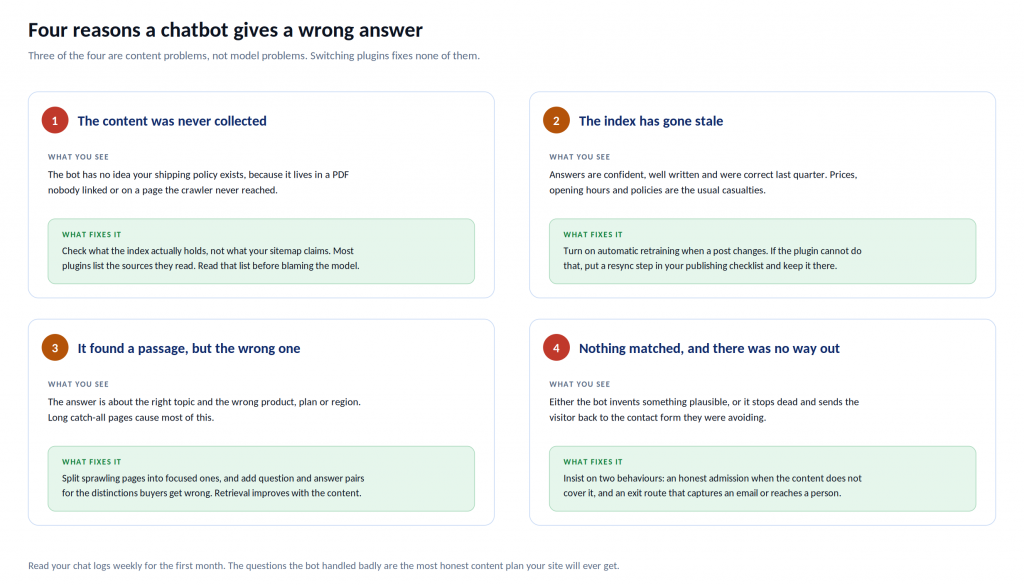
Three of the four are content problems rather than model problems, which means switching plugins fixes none of them.
The content was never collected. Your shipping terms live in a PDF nobody linked, or on a page the crawler never reached. Check what the index actually holds, not what your sitemap claims. Most plugins list the sources they read, and that list is usually shorter than people expect.
The index has gone stale. The answers are confident, well written and were correct last quarter. Prices, opening hours and policies are the usual casualties. This is why automatic retraining when a post changes matters more than anything on a pricing page. If a plugin cannot do it, put a resync step in your publishing checklist and keep it there.
It found a passage, but the wrong one. The answer is about the right topic and the wrong product, plan or region. Long catch-all pages cause most of this, because a page covering six things retrieves for all six and answers well for none. Split sprawling pages into focused ones, and add question and answer pairs for the distinctions your buyers get wrong.
Nothing matched, and there was no way out. Either the bot invents something, or it stops dead and sends the visitor back to the contact form they were trying to avoid. Both are failures, and the second one is more common than vendors admit.
What you can actually train one on
The quality of a chatbot is set almost entirely by what you feed it, so it is worth knowing what a good plugin will accept:
- WordPress content directly. Posts, pages, custom post types. The best implementations read from the database rather than crawling your own site from outside, which is faster and does not miss pages hidden behind odd permalink structures.
- URLs and sitemaps. Useful for documentation on a subdomain, or a help centre you do not control.
- Files. PDFs, Word documents, slide decks. This is where most businesses keep their real answers, and it is the single fastest way to make a bot useful.
- Plain text. For the things that are true but written down nowhere, which is a longer list than most teams realise.
- Question and answer pairs. For the exact phrasings you want handled exactly, and for the distinctions retrieval keeps getting wrong.
A practical note on what to train it on first. Most people upload their marketing pages, because those are the pages they are proud of. Visitors ask about delivery, refunds, compatibility, pricing and whether the thing works with the other thing they already own. Feed it the unglamorous pages first. Your pricing page and your policy pages will earn more than your homepage will.
What happens when it cannot answer
This is the question that separates a chatbot that helps from one that quietly costs you customers, and almost nobody asks it during evaluation.
A bot will fail to answer things. That is not a defect, it is arithmetic: you cannot write down everything. What matters is the behaviour at the boundary.
Look for three things. First, an honest admission rather than an invention. A bot that says it does not have that information is doing its job. Second, a way to capture the person: an email address, a callback request, a ticket. Third, a route to a human that carries the transcript, whether that is a live chat takeover, an email to your team, or a jump into WhatsApp or Messenger with the context attached.
A bot with no exit route sends confused visitors back where they started, except now they are annoyed and they have used up their patience on a machine. You installed the plugin to reduce that, not to add a step to it.
There is a reporting side to this too. The conversations your bot could not finish are the most valuable output it produces. They tell you exactly what your website fails to explain, in your customers’ own words, for free. Any plugin worth using surfaces them somewhere you will actually look.
What a chatbot plugin does to your page speed
This depends on the type again, and it is the section most roundups skip entirely.
A cloud connected widget usually loads a small script that fetches the chat interface after your page has painted. Done properly, the effect on Core Web Vitals is close to nothing, because the widget is not blocking anything the visitor is waiting for. Two things are worth checking anyway: whether the script is deferred, and whether the widget loads on every page or only where you need it. A chat bubble on your checkout is useful. A chat bubble on 4,000 archive pages is a tax.
A self hosted plugin puts the work on your own server instead. There is no third party script, which is good for privacy and for sites with strict content security policies. But AI features that build a searchable index use CPU and database space, and inexpensive shared hosting notices. Bring your own key plugins add response latency you cannot control, because the answer is waiting on your model provider.
Whichever type you choose, test your slowest page with the plugin active and inactive rather than trusting anybody’s published benchmark, including this one.
Where visitor data goes
Worth thinking about before you install rather than after somebody asks.
With a rule based plugin, nothing leaves your server. With every other type, visitor messages travel to a third party in order to be answered. That is not a problem in itself, and it is how essentially all useful chatbots work, but it does mean you have a processor to name and a policy to update.
Three questions to answer before launch. Which company processes the messages, and where are their servers? Is there a data processing agreement you can read and sign? Can you delete chat logs, and is the retention period written down anywhere?
There is also a practical point that has nothing to do with regulation. Visitors type things into chat windows they would never put in a contact form, including order numbers, email addresses and occasionally quite a lot more. Decide now whether you want that stored, for how long, and who on your team can see it.
How to evaluate one properly
Here is the method that works, and it costs nothing.
Write your twenty questions first, before you install anything. Sit with whoever answers your support email and write down the twenty questions real buyers actually ask. Include the awkward ones about refunds, pricing, compatibility and delivery times. Include the two or three where the honest answer is not the one you would like to give.
That list is your scorecard. It is worth more than any comparison table, including the ones on this site, because it is about your business rather than the category.
Then test properly. Install the plugin, train it on your real content, and put all twenty questions to it. Score each answer as correct, partly correct, wrong, or honestly declined. Note that “honestly declined” is a pass and “wrong” is a fail, and that most people accidentally score them the other way round because a fluent wrong answer reads better than an honest no.
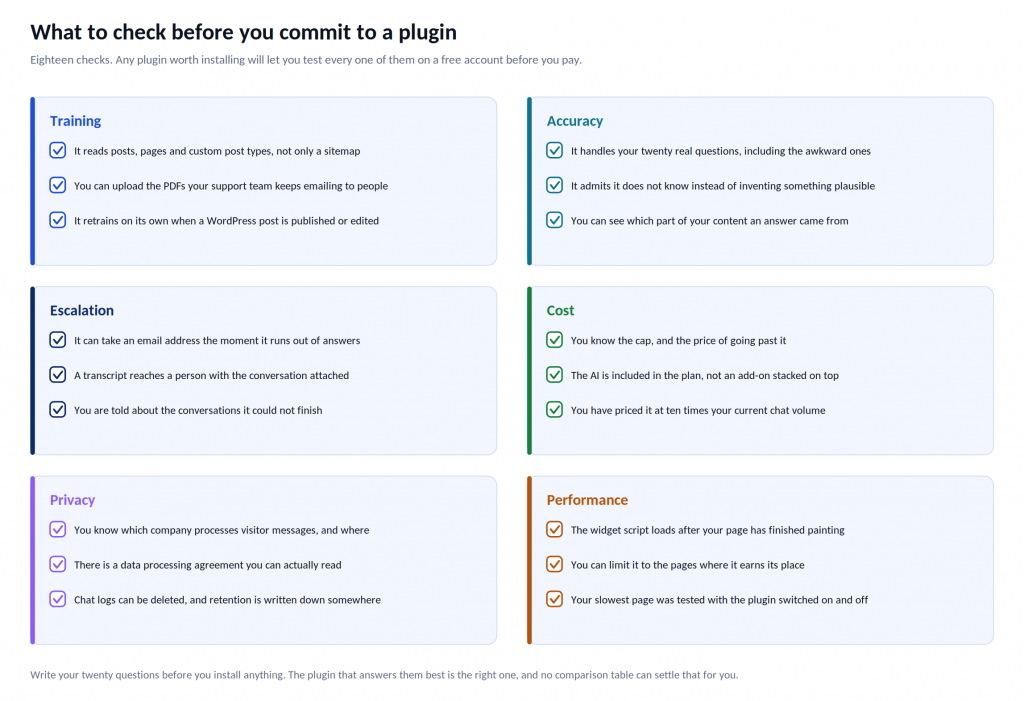
Then check the eighteen items in the graphic above. Training, accuracy, escalation, cost, privacy and performance. Any plugin worth installing lets you test every one of them on a free account before you pay anything, which is the real reason free tiers matter.
Setting one up so it works
The mechanics take about ten minutes for any cloud connected plugin. The judgement is in steps three and five.
- Install and activate. Plugins, then Add New, search, install.
- Connect. Sign in to the vendor account, or paste an API key if you went the bring your own key route.
- Train it on the right things. Your pages and posts, your sitemap, and the PDFs your support team keeps emailing to people. Prioritise pricing, policies, delivery and compatibility over your marketing copy.
- Shape it. Set the tone, the colours, the greeting, and three or four starter questions. Starter questions do more for engagement than any amount of styling, because most visitors genuinely do not know what to ask a bot.
- Interrogate it. Your twenty questions, every one of them, before it goes live.
- Limit where it appears. Put it where conversations are worth having and leave it off the rest.
- Publish, then keep reading. Check the chat logs weekly for the first month.
That last step is the one everybody skips and the one that pays. The questions your bot handled badly are the most honest content plan your site will ever get, written by your customers, in the words they actually use. Fix the content, retrain, and the bot improves without you touching a setting.
Keeping it right
A chatbot is not a thing you install, it is a thing you maintain, and the maintenance is light but not optional.
Turn on automatic retraining if the plugin offers it. If it does not, add a resync to whatever checklist you already follow when you publish. Read the unanswered questions monthly after the first month. Re-run your twenty questions after any significant change to your pricing or your policies. And check once a quarter that the handover route still reaches somebody who works there.
A bot trained in March that is still quoting March prices in September is worse than having no bot at all, because visitors believe it.
Where to start
If you want to see how this works on your own site without spending anything, the fastest route is to install a cloud connected plugin, train it on your policy and pricing pages, and put your twenty questions to it this afternoon. You will learn more in an hour than in a week of reading comparisons.
Our AI ChatBot for WordPress is built for that: it reads your WordPress content directly, accepts your PDFs, retrains when your posts change, and hands the conversation to a person by email or into WhatsApp when it runs out of answers. The free plan switches on the paid features rather than hiding them, so the twenty question test tells you something real before you decide anything.
And whichever plugin you end up with, write your twenty questions first. It is the only part of this process that no vendor can do for you, and it is the part that decides whether the thing works.