
Most WordPress sites collect leads the same way they did in 2012. There is a contact page, a form with six or seven fields on it, and a hope that someone fills it in. The problem is not that the form is broken. The problem is that the form asks a visitor to do work before it has done anything for them.
Chatbot lead capture in WordPress inverts that order. The visitor asks a question, gets a real answer, and only then does the widget ask for a way to follow up. Same goal, different sequence, and the sequence turns out to matter a great deal.
This article covers how in-chat capture actually works: what triggers the ask, what to ask for, where the lead goes afterwards, what the law now requires, and how to tell whether any of it is working. It also covers the cases where you should keep the form exactly as it is.
The contact form is doing less work than you think
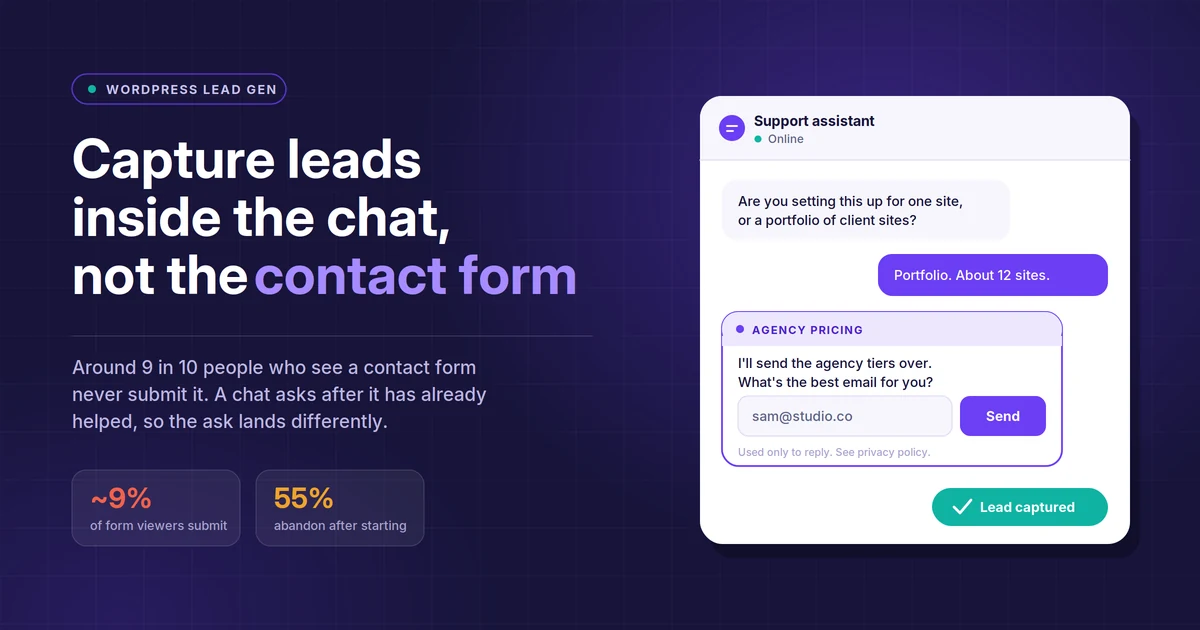
Form analytics from Zuko put contact form submissions at roughly 9% of the people who see the form. Across form types, about 55% of people who start a form abandon it before submitting. Those two numbers together describe a fairly leaky container.
Then there is what happens after submission. The Harvard Business Review audit of 2,241 US companies found an average first response time of 42 hours, with 23% of firms never responding at all. So even the leads that survive the form often expire in an inbox.
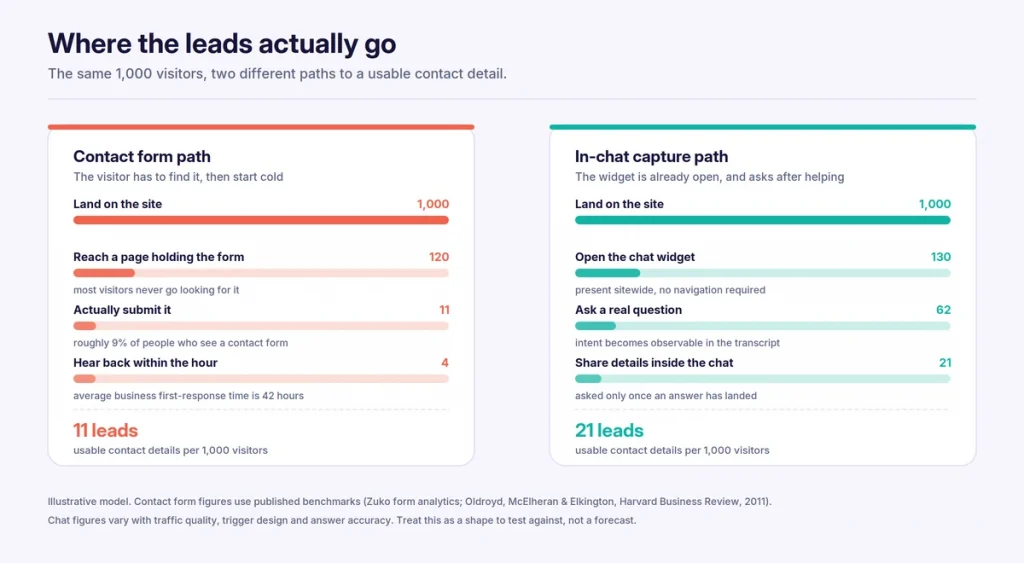
Three structural things go wrong with a form, and none of them are fixed by better button copy.
It asks before it gives. A form is a toll gate. The visitor pays first with their details and receives value later, maybe, at a time the business chooses. That is a bad trade from the visitor’s side, and enough of them work that out.
It asks for everything at once. Every field is a separate opportunity to quit. Research from Formstack found that cutting a form from eleven fields to four lifted conversion by around 120%. The direction of that finding is consistent across studies even where the exact figures differ.
It is a dead end for the visitor. They hit submit, they see a thank-you page, and they have learned nothing. If their question was “do you support multisite,” they still do not know. They will go and find out from someone who tells them faster.
What chatbot lead capture in WordPress actually means
The phrase gets used loosely, so it is worth separating three different things that all get called the same thing.
A pre-chat form is a form in a smaller box. The widget opens and demands a name and email before it will say anything. This performs about as well as the contact form it replaced, because it is the contact form it replaced.
A scripted chat flow walks the visitor down a fixed decision tree of buttons. It works for simple routing and fails the moment someone types something the tree did not anticipate.
In-chat capture on an AI assistant is different in one specific way: the ask is conditional on the conversation. The bot answers from your own content first, watches for a signal that the person is worth following up with, and asks for a contact detail at the point where the visitor has a reason to give one.
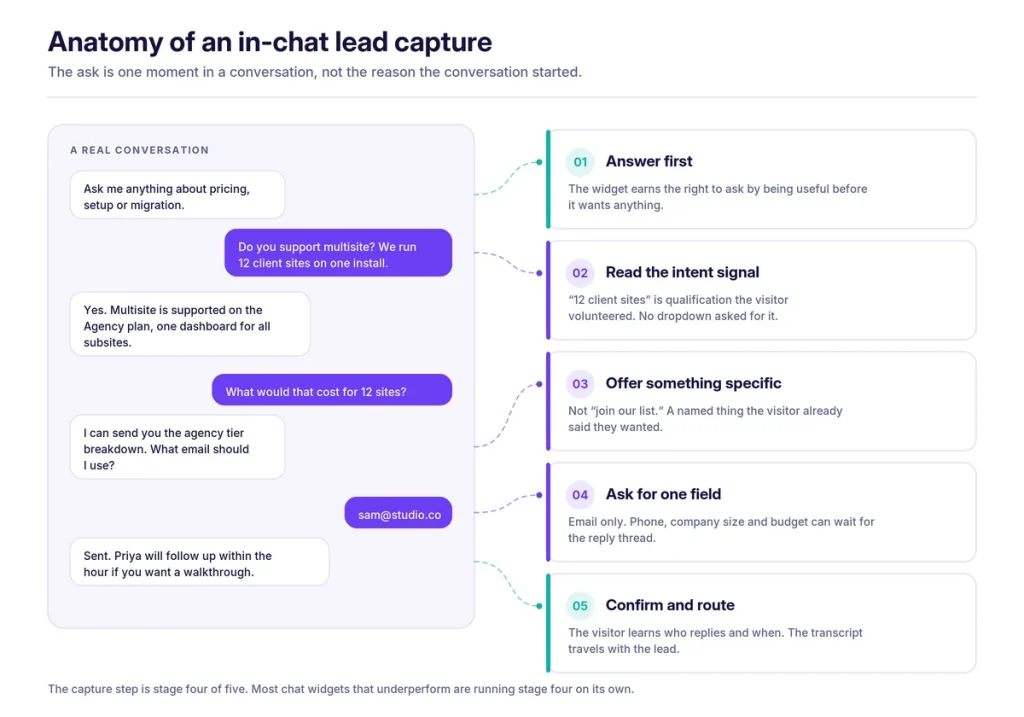
Notice where the capture sits. It is the fourth of five stages. Most chat widgets that underperform are running stage four on its own, which is just a form with a chat bubble drawn around it.
The trigger is the whole game
If you change one thing about how your widget captures leads, change when it asks. Trigger timing moves capture rates further than the wording of the ask does, and it is the setting most people never touch.
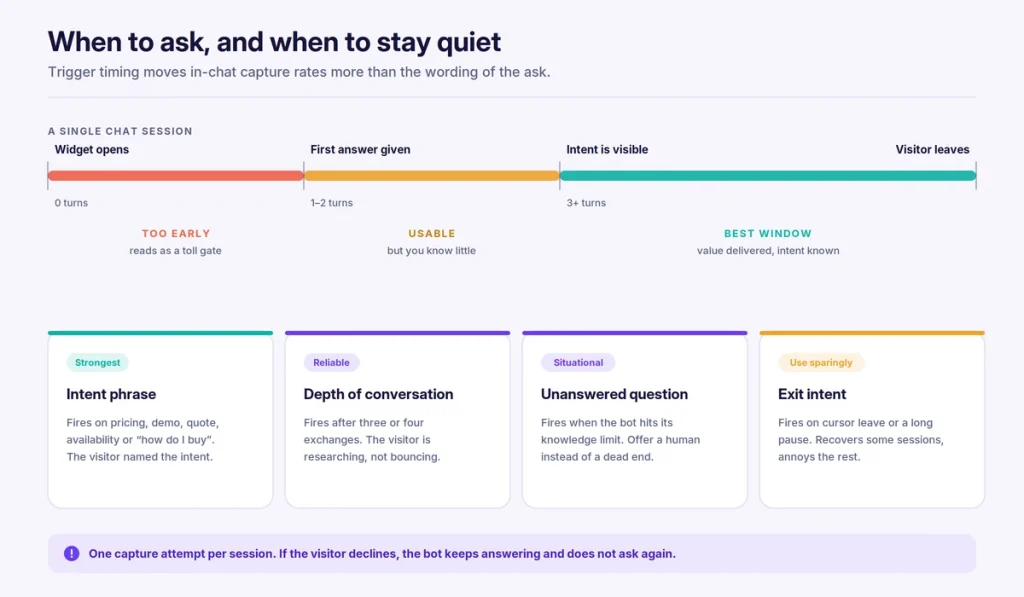
Four triggers are worth configuring, roughly in order of how well they perform.
An intent phrase. The visitor types something that names a buying intent: pricing, quote, demo, availability, “how do I get started,” “can you do this for us.” This is the strongest signal you will get, because the visitor produced it unprompted. Set your bot to offer a follow-up when these appear.
Conversation depth. After three or four exchanges, someone is researching rather than bouncing. A depth trigger catches people whose intent is real but unspoken. It fires later than an intent phrase, which is usually fine.
An unanswered question. When the bot reaches the edge of what it knows, the honest move is to say so and offer a person instead. A fallback that ends in “I’m not sure, but I can have someone answer this properly, what’s your email” converts well precisely because it is not a sales move.
Exit intent. The cursor heads for the tab bar, or the session goes quiet. This recovers some conversations and irritates others. Use it, but use it last, and do not stack it on top of a trigger that has already fired.
One rule sits above all four: ask once per session. If the visitor declines, the bot keeps answering questions and does not raise it again. A widget that nags is worse than no widget, and it teaches people to close the bubble on sight.
Ask for less, because the conversation already told you more
A form has to ask for everything, because it has nothing else to go on. A conversation does not. By the time the ask arrives, the transcript already contains most of what a form would have demanded.
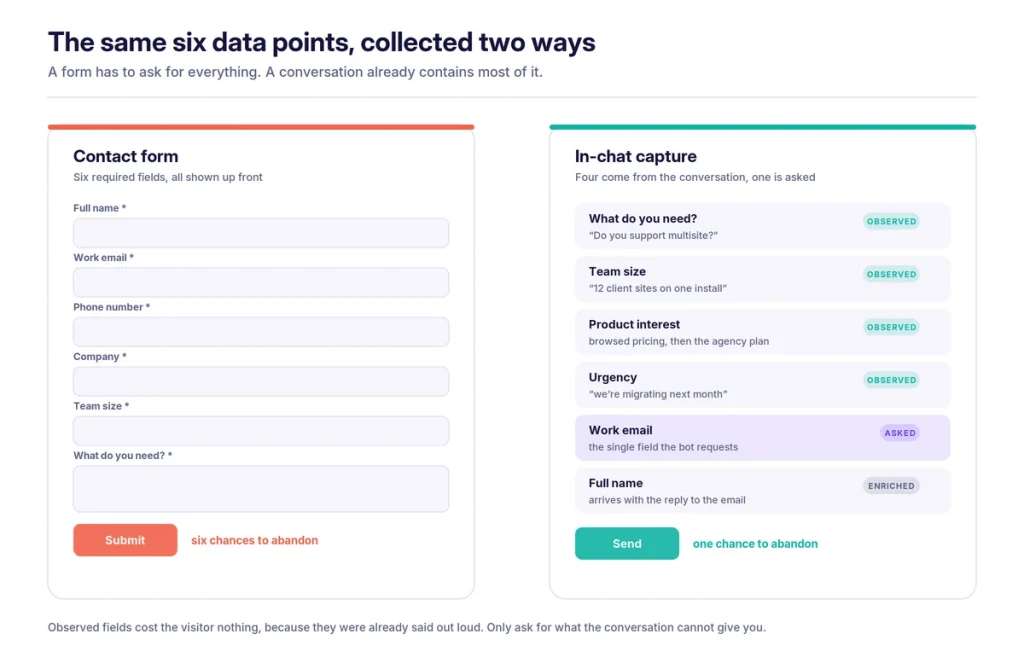
This is the practical difference. Instead of six required fields, you have one, and the qualification data arrives free because the visitor volunteered it in their own words. “We run twelve client sites” is better qualification than a dropdown labelled “team size,” because it came with context a dropdown cannot hold.
So ask for the email and stop. Phone number, company, budget and role can all wait for the reply thread, where you have earned the right to ask. If you must collect a second field, make it one the visitor benefits from answering.
Three things to get right in the wording:
Name the exchange. “Can I take your email?” is a request. “I’ll send you the agency tier breakdown, what email should I use?” is a trade. The second one tells the visitor exactly what they get and exactly why you need the field.
Validate in the message, not after it. If the address is malformed, say so in the next chat message and let them retype it. Do not accept it silently and lose the lead to a typo.
Say what happens next. “Priya will follow up within the hour” sets an expectation you can then meet. It also quietly tells the visitor a human exists behind the widget.
Where the lead goes decides whether it was worth capturing
Capturing the detail is the easy half. A chatbot that writes a lead into a dashboard nobody opens has moved the problem rather than solved it.
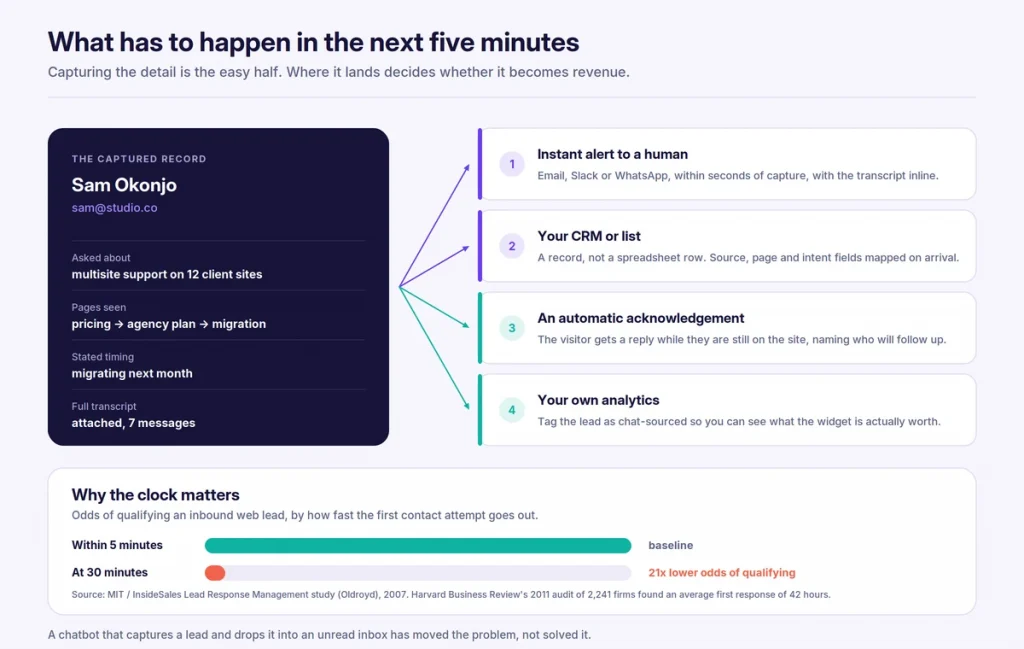
The MIT and InsideSales Lead Response Management research, run by Dr James Oldroyd, found that contacting a web lead at five minutes rather than thirty raises the odds of qualifying it by around 21 times, and the odds of making contact at all by around 100 times. Those multipliers are frequently miscredited to Harvard Business Review, which published a separate 2011 study. Both point the same way.
Four routes matter, and you want all of them running:
- An alert to a person within seconds. Email, Slack or WhatsApp, with the transcript inline so whoever picks it up does not have to ask the visitor to repeat themselves.
- A record in your CRM or list. Map the source page, the intent phrase and the timing signal onto real fields at the point of creation. Retrofitting this later never happens.
- An acknowledgement to the visitor. Send it while they are still on the site. Name the person who will follow up.
- A tag in your own analytics. Mark the lead as chat-sourced so you can eventually answer the question of what the widget is worth.
Add basic hygiene while you are in there: deduplicate against existing contacts, rate-limit submissions from a single session, and drop obvious junk before it reaches a human.
Consent, disclosure, and what changed in August 2026
A chatbot that collects a name, an email or a phone number is processing personal data, and the business running the site is the controller even when a third party supplies the technology. Three obligations apply directly to how you build the capture flow. None of what follows is legal advice, and a lawyer in your jurisdiction should confirm it.
A lawful basis, before collection. Under GDPR Article 6 you need one. For lead capture the realistic options are consent or legitimate interests. Consent is easier to evidence to a regulator because it is documented, which is why most capture flows use it.
Transparency at the moment of collection. Article 13 requires you to say who you are, why you want the data, how long you will hold it and what rights the person has. In a chat window that means a short line next to the field, not a link buried in the footer. One sentence and a privacy policy link is usually enough.
Disclosure that the visitor is talking to an AI. Article 50 of the EU AI Act started applying on 2 August 2026, and it lands directly on anyone running a customer-facing chatbot, not just on the companies building the models. Two details matter for how you configure the widget. First, the disclosure has to be perceivable in the interaction itself, so a line in your terms and conditions does not count, and draft Commission guidance suggests a vague label such as “assistant” may not be enough on its own. Second, the rule follows the user rather than the business, so a WordPress site outside the EU that serves EU visitors is in scope. Penalties reach €15 million or 3% of worldwide turnover.
In practice this is a small change: state in the opening message that people are chatting with an AI assistant, and name the human path if they want one.
Then apply data minimisation, which is good conversion practice anyway. Collect the one field you need, set a retention period for transcripts, and make sure you can find and delete a person’s chat history if they ask, within one calendar month.
When a contact form is still the right answer
In-chat capture does not replace the form. Anyone who tells you otherwise is selling something. Keep the form for:
- Anything requiring a file upload. Briefs, specs, CVs, tender documents. Chat is the wrong container.
- Structured requests where the fields genuinely are the point. Quote requests with quantities, dates, SKUs and delivery addresses need a form, because you need the data in exactly that shape.
- Regulated or legal intake, where you need a signed, timestamped, auditable record of precisely what was submitted.
- Accessibility. Chat widgets vary enormously in how well they work with screen readers and keyboard navigation. A plain, well-labelled HTML form remains the most reliable interface for assistive technology, and removing it removes an option for people who depend on it.
- Visitors who simply prefer it. Some people want a paper trail and a copy in their sent folder.
The right setup is both. Run the chat widget sitewide, keep the form on the contact page, and let the visitor choose. The two audiences overlap less than you would expect.
How to measure it without fooling yourself
The tempting comparison is “chat leads versus form leads,” and it is the wrong one, because some of your chat leads would have filled the form anyway. Measure the funnel properly instead.
Track five numbers:
- Widget open rate. Sessions that open the chat, as a share of all sessions.
- Engaged conversation rate. Conversations with at least two visitor messages. This filters out accidental clicks.
- Capture rate per engaged conversation. Of the conversations where a trigger fired, how many produced a contact detail.
- Qualified rate. Of those, how many your sales team would call real. This is the number that decides whether the widget is a lead source or a noise source.
- Time to first human reply. Against the five-minute benchmark.
Then answer the cannibalisation question honestly. Look at contact form volume for the eight weeks before you launched the widget and the eight weeks after. If form volume held steady and chat leads are additional, the widget is adding pipeline. If form volume fell by roughly the number of chat leads you gained, you have changed the channel rather than the total, which is still worth something because chat leads arrive faster and with more context, but it is a different claim.
Resist chasing a benchmark for capture rate. It swings wildly with traffic quality, product complexity and how well your bot answers. Your own trend line over eight weeks is more useful than anyone else’s average.
Setting it up on a WordPress site
The mechanics are quick. Getting the content right is what takes the time.
Train the bot on what buyers actually ask about. Pricing pages, product documentation, comparison pages, shipping and returns policies, the FAQ. A bot trained only on your blog will answer beautifully about topics nobody is buying. If your assistant supports uploads, add the PDFs your sales team already sends to prospects.
Install and place it. Most tools give you a WordPress plugin or a script tag. If you are weighing options, our comparison of WordPress chatbot plugins covers what separates them, and how WordPress chatbot plugins work explains the underlying mechanics. Run it sitewide rather than on the contact page alone, since the point is to catch intent wherever it appears.
Configure the triggers before you launch. Write your intent phrase list from real data: pull the top queries from Search Console and your site search log. Set the depth trigger to three or four turns. Write the fallback message. Leave exit intent off for the first month.
Wire up the routing. Alert destination, CRM mapping, visitor acknowledgement, analytics tag. Test each one with a real submission before you go live.
Read the transcripts every week for a month. This is the step people skip and the one that produces all the gains. You will find questions your bot answered badly, triggers that fired too early, and phrases your customers use that are nowhere on your site. Fix the content, retune the triggers, repeat.
AI BotKit handles this pattern on WordPress specifically: it syncs your posts, pages, products and custom content in one click, captures leads inside the conversation, and pushes them to email, WhatsApp or your CRM. There is a free plan if you want to test the flow before committing, and the pricing page sets out where the lead capture features sit.